

By purchasing Essentials you are making an investment.
This package becomes more valuable with the release of each update, and you will receive all future updates for free.
Version 3.2 Check presentation page
Added
- New Dashboard interface.
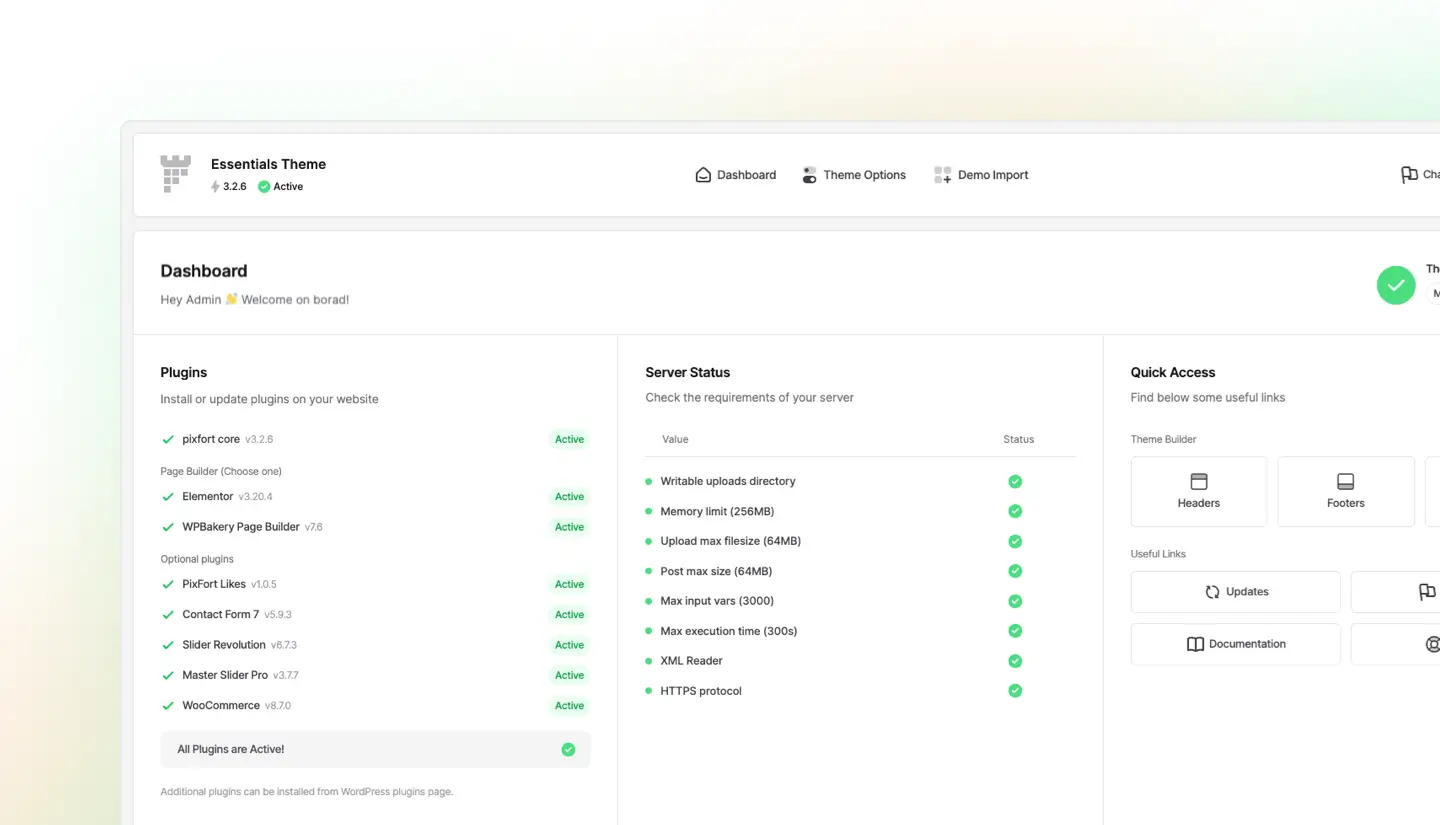
- New Theme installation wizard.
- Feature element link translation in WPML.
- Apply custom Category option in Portfolio element with Blog post type in WPBakery.
Updated
- Updated WPBakery plugin to the latest version.
- Updated Slider Revolution plugin to the latest version.
- Updated Master Slider plugin to the latest version.
- Display Highlighted Box image alt text.
- Updated translation files.
Bug Fixes
- Badge background color in Pricing element in WPBakery.
- Custom footer option for the custom 404 page.
- Minor bug fixes.
Added
- Use templates inside Accordion items in Elementor.
Updated
- Updated translation files.
- The One Click Demo Import plugin was removed and it’s no longer needed to import the demo content (demo import is now available directly within pixfort core plugin).
Bug Fixes
- Progress Bars animation when multiple elements are in the same page.
- Display Elementor sections normally in Safari browser.
- Minor bug fixes.
Updated
- Keep empty HTML paragraph tags which have ID, Class or Role attributes.
- Updated translation files.
Bug Fixes
- FAQ element content in Elementor plugin.
- Display system fonts as main Body or Heading fonts.
- Minor bug fixes.
Updated
- Optimized page transition animation loading style.
- Updated translation files.
Bug Fixes
- WooCommerce product stars font icons styling.
- Minor bug fixes.
Added
- Responsive Highlighted text custom font size in Elementor.
- Responsive Numbers text custom font size in Elementor.
Updated
- Optimized elements loading.
- Optimized elements inline css loading.
- Optimized Cart sidebar loading.
- Optimized Header search overlay loading.
- Updated translation files.
Bug Fixes
- Minor bug fixes.
Added
- Dynamic links for Circle element items in Elementor.
- HTML tag option for Heading element in Elementor.
Updated
- Updated WPBakery plugin to the latest version.
- Optimized asset loading for the pixfort Likes plugin.
- Enabled display of private Portfolio items in the Portfolio carousel element for logged-in users.
- Updated the display of the last item in the Levels element to match the item point.
- Enabled shortcodes inside Card element fields.
- Optimizations for CSS and JavaScript files.
- Improved settings modal for Header builder elements.
- Updated translation files.
Bug Fixes
- Tabs badge custom background color in Elementor.
- Tabs Title bold option in Elementor.
- Photo box Infinite animation option in Elementor.
- Promo box custom title size option in Elementor.
- Image box custom title size option in Elementor.
- Numbers top text custom size option in Elementor.
- Increase vertical view option in Carousels in Elementor.
- Highlighted text display custom gradient panel inside Elementor builder.
- Marquee Duotone icons custom color.
- Shop category rounded corners option.
- Minor bug fixes.
Added
- New Intuitive pixfort Theme Options Interface.
- Theme Options performance improvements.
- Theme Options instant options search.
- Theme Options search shortcut.
- Quick option locator in Theme Options search.
- Theme Options help tooltips.
Updated
- Updated WPBakery plugin to the latest version.
- Updated Slider Revolution plugin to the latest version.
- Updated pixfort Likes plugin for compatibility with the latest PHP version.
- Popups loading optimizations.
- Use custom 404 page title.
- CSS and Javascript files optimizations.
- Display custom page header while global site header is disabled in Theme options.
- Updated Google fonts list.
- Updated translation files.
Bug Fixes
- Highlight Box and Feature elements empty image value fix.
- Minor bug fixes.
Version 3.1 Check presentation page
Added
- Enabled using shortcodes in Card element Title and Text.
- Styling files optimizations.
Updated
- Updated WPBakery plugin to the latest version 7.2.
- Updated Elementor plugin support to the latest version.
- Updated Google fonts list.
- Updated translation files.
Bug Fixes
- Custom mobile Header background color option.
- Minor bug fixes.
Added
- Megamenu full width size matches the custom website grid width when using large custom grid width values.
Updated
- Updated Slider Revolution plugin to the latest version 6.6.18.
- Updated translation files.
Bug Fixes
- Minor bug fixes.
Added
- Enabled using HTML tags inside the Circles Title tooltip.
Updated
- Updated Slider Revolution plugin to the latest version 6.6.17.
- Updated WPBakery plugin to the latest version 7.1.
- Updated translation files.
Bug Fixes
- Empty WooCommerce category breadcrumbs.
- Full Image WooCommerce Product item style background image in Safari browser.
- Minor bug fixes.
Added
- Heading element custom font size option with HTML Heading tags.
Updated
- Updated Slider Revolution plugin to the latest version 6.6.16.
- Display Essentials admin top bar links for users with permissions to manage WordPress options only.
- Contact Form 7 default
"tel"input field style. - Updated translation files.
Bug Fixes
- Disable Intro parallax effect option.
- Highlighted text custom color option.
- Minor bug fixes.
Added
- X (Previously Twitter) social icon.
Updated
- Updated WPBakery plugin to the latest version 7.0.
- Updated Slider Revolution plugin to the latest version 6.6.15.
- Header buttons without text (only icon) display without extra padding.
- Header Cart button link automatically uses the custom cart page link in WooCommerce plugin.
Bug Fixes
- Apply options normally in Social Icons element in Elementor plugin.
- Minor bug fixes.
Added
- YouTube link option in Social Links widget.
Updated
- Updated Envato Market plugin to the latest version.
- Sticky footer opacity transition.
- Updated translation files.
Bug Fixes
- Parallax animation on WPBakery particles items.
- Minor bug fixes.
Updated
- Disable loading mouse hover 3D animation files in touch devices.
- Display gradient Heading text with default scroll background attachment.
- Updated translation files.
Bug Fixes
- Minor bug fixes.
Updated
- Display WordPress image alt text for background images.
- Initialize Tabs elements inside Popups.
- Updated translation files.
Bug Fixes
- Apply responsive section display options to Dividers in Elementor.
- Disable font preconnect meta tag when secondary font is not set.
- Hide WooCommerce mini cart widget title in sidebar area.
- Slides footer display in WPBakery.
- Saving the Slides option in page options.
- Minor bug fixes.
Updated
- Updated WooCommerce “quantity-input” template file to the latest version.
- Updated translation files.
Bug Fixes
- Stretched Section Dividers in Elementor when Elementor plugin Experiments are enabled.
- Display Popup when created with WPML plugin.
- Clients element empty image variable check.
- Minor bug fixes.
Added
- New pixfort Popup Options Interface.
- 39 New Premade Popups.
- Popup Display Conditions.
- Improved Popup loading speed.
- Popup width and height options.
- Individual Popup Triggers (on page load, on exit, on scroll, on scroll to element).
- Display Popup up to X times.
- Popup Design options (position, style, animation, backdrop, close button, etc…).
- New Popup Launcher (customize position, branding, style, etc…).
- Control Popup visibility (execute popup triggers on certain screen sizes).
- Custom CSS option for popups.
- Optimized CSS files size, loading and structure.
- Optimized Javascript files loading and performance.
- Optimized default browser animations loading.
- Added Portfolio Carousel Full image option.
- Added video placeholder option to the Video element.
- Added
aria-labelattribute to Cart close button
Updated
- Updated WPBakery plugin to the latest version.
- Updated Slider Revolution plugin to the latest version.
- Updated translation files.
Bug Fixes
- Map element marker pin image.
- Minor bug fixes.

Updated
- Updated WPBakery plugin to the latest version.
- Updated Slider Revolution plugin to the latest version.
- Updated Envato Market plugin to the latest version.
- Updated translation files.
Bug Fixes
- Auto video poster image in Elementor.
- Fancy box link accessibility in iOS browsers.
- Minor bug fixes.
Updated
- Update WooCommerce Quantity Input template file version number to the latest version.
- Updated translation files.
Bug Fixes
- Custom Header background color scroll.
- Mobile menu nest items toggle.
- Product preview popup overflow.
- Mobile Sliding background image size in Highlighted Box.
- Minor bug fixes.
Updated
- Update WooCommerce Quantity Input template file version number to the latest version.
- Updated Slider Revolution plugin to the latest version.
- Removed hover border radius for Comparison table items without shadow style.
- Updated translation files.
Bug Fixes
- Slider border radius fix.
- Header Cart icon scroll color fix.
- WooCommerce Nested Categories widget items display fix.
- Mobile nested mega menu items fix.
- Custom 404 page hide Intro area option fix.
- Minor bug fixes.
Added
- Portfolio element images “width” and “height” attributes.
Updated
- Update WooCommerce Quantity Input template file version number to the latest version.
- Updated translation files.
Bug Fixes
- Intro area placeholder height in Portfolio Category page
- Minor bug fixes
Added
- Separate Menu items IDs for Menus in Mobile.
- Added Progress Bar element “aria-label” attribute (Accessibility)
- Apply custom WooCommerce Cart page title.
- Allow empty features list inside Pricing element in Elementor plugin.
Updated
- Updated Slider Revolution plugin to the latest version.
- Updated Master Slider plugin to the latest version.
- Update WooCommerce Login Form template file version number to the latest 7.0.1 version.
- Removed “user-scalable” meta attribute value from Header.
- Updated translation files.
Bug Fixes
- WPBakery section width update added inside WooCommerce product tabs.
- WPBakery content update inside Tabs element.
- Minor bug fixes
Added
- Demo Elementor pages inside Elementor Landing Pages.
- Automatically hide Comparison Table Title box in mobile if Title text is not set.
- Display the optional WordPress Archive description text when Intro area is enabled.
Updated
- Updated WPBakery plugin to the latest version.
- Updated Slider Revolution plugin to the latest version.
- Only display published posts in Search suggestions.
- Static Tabs element items IDs in Elementor.
- Updated translation files.
Bug Fixes
- Minor bug fixes
Added
- Banner button link translate option.
- Banner custom background color option.
Updated
- Updated WooCommerce Login Form template version number.
- Updated translation files.
Bug Fixes
- Minor bug fixes
Added
- Related Posts style option.
- Custom Slider element height option.
- Slider element disable Navigation option.
Updated
- Updated Company Elementor demo content to include new Dividers and Tabs elements.
- Updated Slider Revolution plugin to the latest version.
- Popups close state when using caching plugins.
- Archive page titles to use H1 tags.
- Updated the usage of the deprecated Elementor function
"is_built_with_elementor"to use the new function implementation. - Updated translation files.
Bug Fixes
- Header custom background color.
- Mobile top bar border display.
- Elementor CTA element title bold option.
- Minor bug fixes
Added
- Added option to Hidden Menu style to remember if user opened the Menu.
- Improved header menu caching.
- Shop category element advanced styling options in Elementor.
Updated
- Updated Slider Revolution plugin to the latest version.
- Page transition optimization.
- Apply
do_shortcodein Pricing element. - Team member image dimensions attributes.
- Updated translation files.
Bug Fixes
- Special characters in Sliding text element.
- Promo box shadow fix.
- Card image outline fix.
- WPBakery backend Tabs and Accordion delete.
- Image Carousel with link animation fix.
- WooCommerce dropdown background color in Safari browser fix.
- Image Box parallax fix.
- Comparison table mobile tooltip fix.
- Default WordPress Gallery block display fix.
- Map zoom fix.
- Minor bug fixes
Added
- 3 New full demos (Digital Agency, Consulting and Minimal)
- 25+ New inner pages.
- 100+ New premade templates (now 770+ pixfort templates in total).
- New Marquee element.
- Images and custom gradients option in Highlighted Text element.
- New options for Alert element.
- New animation control options for Sliding Text element.
- Vertical text option for Heading element.
- New Consulting Demo Menu,
- pixfort Elements interface in Elementor.
- pixfort Options interface in Elementor.
- pixfort Shape Divider interface in Elementor.
- Option to use Templates for Tabs in Elementor.
- Custom gradient background option.
- 3D Animations for elements.
- Smart Sticky header option in header builder.
- Custom cursor.
- 3 New divider shapes.
- Custom loading animation.
- Option to show 2 clients in a row in mobile for Clients element.
- Custom Heading font Bold font weight option.
- Optimized theme file size.
- Advanced Text element in WPBakery. In Elementor, added advanced text option for the Text element.
Updated
- Updated Slider Revolution plugin to the latest version.
- Page transition optimization.
- Image styling options.
- Updated translation files.
Bug Fixes
- Default WordPress Search widget style.
- Minor bug fixes
Version 2 Check presentation page
Added
- Border options in Elementor Pricing element.
- Advanced options in Elementor Promo Box element.
- Advanced design options for Badge in WPBakery Pricing element.
- WooCommerce Variations
selectfield default styling.
Updated
- Updated Slider Revolution plugin to the latest version.
Bug Fixes
- Added Custom Background color in Elementor Icon element.
- Minor bug fixes.
Added
- Responsive Highlighted Text position inside Elementor plugin.
Updated
- Updated Slider Revolution plugin to the latest version.
- Updated WPBakery plugin to the latest version.
- Updated PixFort Likes plugin to the latest version.
Bug Fixes
- Display Highlighted text element custom color directly inside Elementor builder.
- Minor bug fixes.
Added
- Theme styling to WooCommerce pagination.
Updated
- Updated Slider Revolution plugin to the latest version.
- Updated Envato Market plugin to the latest version.
Bug Fixes
- Minor bug fixes.
Added
- Custom WooCommerce category Intro background image option.
Updated
- Updated Google Fonts list.
- Updated Slider Revolution plugin to the latest version.
- Updated 3D effect script to the latest version.
- Updated Carousel effect script to the latest version.
- Updated language translation files.
Bug Fixes
- Fixed Story element animation.
- Fixed Gallery element loading in WPBakery Tabs element.
- Minor bug fixes.
Added
- Compatibility with the latest version of “Elementor Pro” plugin.
- Display WooCommerce Archive page description.
- Sticky footer automatic screen height check.
- Faster Elementor icons selector field.
- Added WooCommerce display “Out of stock” option to Product carousel element.
Updated
- Updated Slider Revolution plugin to the latest version.
- Changed WooCommerce single product price HTML to the default
<p>tag. - Updated language translation files.
Bug Fixes
- Display Fancy Mockup element under Sticky header.
- WooCommerce downloads page links transition.
- Minor bug fixes.
Bug Fixes
- Display Elements styling regardless of using invalid custom Element ID.
- Display Product preview popup close button in Mobile devices.
Added
- Company demo menu into One click importer plugin.
- Carousels Optimizations.
- Disable Portfolio Category Intro option.
- WooCommerce Shop page custom header.
- Content stack element image “Alt” attribute.
- Apply
do_shortcode()on Card wide element Title & Text.
Updated
- Updated Slider Revolution plugin to the latest version.
- Updated WPBakery plugin to the latest version.
- Updated language translation files.
Bug Fixes
- WordPress default posts page intro.
- Long texts wrap in popups.
- PHP warning array check in header options.
- Banner gradient text color.
- Disable
tel:&mailto:links click page transition. - “Product carousel left Ecommerce” template in WPBakery.
- Highlighted text & Responsive spacer elements custom ID.
- 3D Box hover button accessibility.
- Minor bug fixes.
Updated
- Updated Slider Revolution plugin to the latest version.
- Updated WPBakery plugin to the latest version.
- Updated language translation files.
Bug Fixes
- Minor bug fixes.
Added
- Header and Stack areas custom background color options.
- Testimonials Slider element animation option.
- Computability with the latest version of “YITH WooCommerce Wishlist” plugin.
Updated
- Updated Slider Revolution to the latest version.
- Updated language translation files.
Bug Fixes
- Display “Circles” element default animation.
- Settings duo tone icon background.
- Minor bug fixes.
Added
- WordPress Customizer Mega menu options support.
- Portfolio item navigation in the same category option.
- Accordion scroll to item top with long content.
- 5 items per line option in Levels element.
Updated
- Updated language translation files.
Bug Fixes
- Minor bug fixes.
Added
- Added link Mega menu title items as Pages/Posts support.
- Added custom Logo image “Alt” attribute.
Updated
- Updated Slider Revolution to the latest version.
- Updated Master Slider to the latest version.
- Updated language translation files.
Bug Fixes
- Display the footer translation correctly in WPML and Polylang plugins.
- Minor bug fixes.
Added
- added Author image width and height attributes.
- Shortcodes support in Team member title and name.
- WooCommerce select field styling.
Updated
- Updated Slider Revolution to the latest version.
- Optimized WPML translation options for complex WPBakery elements.
- Optimized slider viewport loading to pause when not visible.
- Optimized dynamic style loading in popups.
- Updated language translation files.
Bug Fixes
- Compatibility fixes with the latest version of YITH WooCommerce Wishlist plugin.
- Minor Typos and bug fixes.
Added
- Added Portfolio sidebar in Portfolio archives.
- Enabled Homepage Intro title.
Updated
- Updated elements icons in Elementor builder.
- Update language translation files.
Bug Fixes
- Updated Slider Revolution plugin to the latest version.
- Minor Typos and bug fixes.
Added
- Accessibility screen reader text for Search and Cookies elements.
Updated
- Update language translation files.
Bug Fixes
- Gradient Animated Heading bar color.
- Gradient Highlighted text hover visibility.
- WooCommerce Shop intro options.
- Minor bug fixes.
Added
- Tabs custom text colors options.
- Team members advanced Elementor Typography options.
- Feature list link option.
- HTML5 Video support in Pix Video element.
- Disable Image Lazy loading option in Theme options.
Updated
- Updated Slider Revolution plugin to the latest version (v6.5.4).
- Updated Master Slider plugin to the latest version (v3.5.5).
- Updated WPBakery plugin to the latest version (v6.7.0).
- Removed the link from Photo Box element when not defined.
- Update language translation files.
Bug Fixes
- Gradient text color in Animated Heading element.
- Custom sidebar in blog page templates.
- Display custom header/footer in custom 404.
- Minor bug fixes.
Added
- Header Button element icon option.
- Yelp, Soundcloud and Tripadvisor social header icons.
- Archives, Categories, Tags, Authors and Search pages follow Blog layout.
- Disable top loading bar option.
- WooCommerce colors improvements.
- Responsive Elementor styling options in many elements.
- Custom Headings line heights options.
Updated
- Updated Highlighted text to allow using global colors in Elementor.
- Update language translation files.
- Top Banner close button accessibility attribute.
Bug Fixes
- Clients carousel links target fix.
- Fancy mockup link.
- Init Tabs elements inside Popups.
- Minor bug fixes.
Added
- Custom post types categories filter (check details here).
Updated
- Updated Slider Revolution plugin to the latest version.
Bug Fixes
- Pix Text left align in WPBakery.
- Fixed disable intro option in Blog page.
Added
- 3 New full demos (Company, Gallery and Modern)
- 18+ New inner pages.
- 80+ New premade templates (now 665+ pixfort templates in total).
- New Comparison table element (view element).
- New Gallery element (view element).
- New Hidden menu style (check it in Gallery demo).
- New Floating Box Search style (check it in Company demo).
- Menu icons (check it in Company demo).
- 5 New Mega Menu sizes (check an example in Company demo).
- Dynamically enqueue scripts and styling option for Popups (in Theme Options).
Updated
- Updated Slider Revolution plugin to the latest version.
- Page transition optimization.
- WPML and Polylang String translation.
- Custom line height in Highlighted text element.
- Social links accessibility.
- Updated translation files.
- Custom mobile intro padding option.
- Open Logo in new tab option (in header builder).
- Disable fixed Primary Gradient color option (in Theme Options).
- Promo box enhancement.
- Fancy box image alternative text option.
Bug Fixes
- Text widget custom color issue in Elementor 3.2.2
- Columns alignment in Header Builder.
- Minor bug fixes
Version 1.2
Check changelog for version 1.2
Version 1.1
Check changelog for version 1.1
September - 2020
A New Revolution in WordPress Industry!
Made with Love ✨
